EMAIL FORENSICS & PHISHING INVESTIGATION
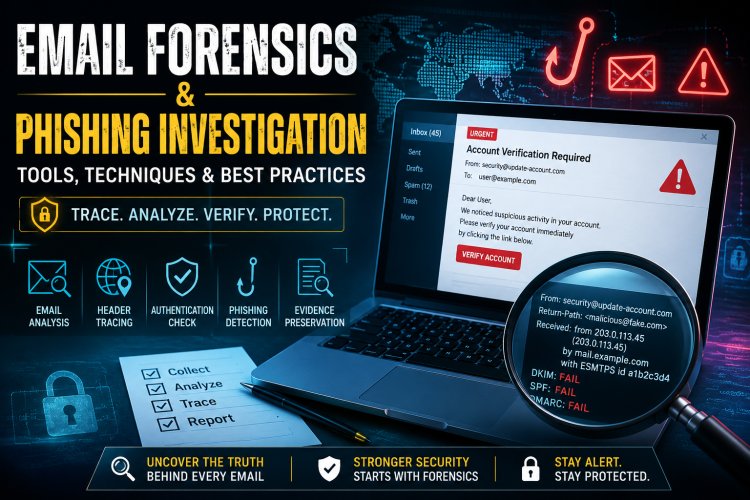
What is Email Forensics? Email forensics is the process of collecting, analyzing, and preserving email data to identify: Sender identity Email origin (IP, server path) Content authenticity Malicious intent (phishing, fraud, malware) It is widely used in: Cyber crime investigations Corporate fraud cases Legal evidence collection
What is Phishing?
Phishing is a social engineering attack where attackers impersonate trusted entities to:
- Steal credentials (username/password)
- Extract OTPs / banking info
- Install malware
Types of Phishing
- Email Phishing – Fake emails (most common)
- Spear Phishing – Targeted attack
- Whaling – Targeting executives
- Clone Phishing – Copy of legitimate email
- Business Email Compromise (BEC)
EMAIL FORENSIC INVESTIGATION PROCESS
1. Evidence Collection
- Collect original email (not screenshot )
- Export email files:
.eml,.msg,.pst
- Maintain chain of custody
Sources:
- Gmail / Outlook mailbox
- Mail server logs
- Backup systems

2. Email Header Analysis (MOST IMPORTANT)
Email headers reveal:
- Sender IP address
- Mail servers (Received fields)
- Authentication results (SPF, DKIM, DMARC)
Key Fields:
From→ Displayed sender (can be fake)Return-Path→ Actual senderReceived→ Mail server route (trace path)Message-ID→ Unique identifier
Investigator goal:
Find real origin IP and trace it
3. IP Address Tracing
- Extract IP from header
- Use tools to identify:
- Location
- ISP
- Hosting provider
Note:
Attackers may use:
- VPN
- Proxy
- TOR network
4. URL & Link Analysis
Phishing emails contain malicious links:
- Fake login pages
- Malware downloads
Techniques:
- Hover over link (check real URL)
- Decode shortened URLs
- Analyze domain age

5. Attachment Analysis
Check for:
- Malware (.exe, .zip, .docm)
- Embedded scripts
Techniques:
- Static analysis (file properties)
- Dynamic analysis (sandbox execution)
6. Content Analysis
Look for:
- Urgency (“Act now!”)
- Threat language
- Grammar mistakes
- Fake branding
7. Email Authentication Check
Verify:
- SPF (Sender Policy Framework)
- DKIM (DomainKeys Identified Mail)
- DMARC (Domain-based Authentication)
If these fail → High chance of spoofing
8. Timeline Reconstruction
- When email was sent
- When opened
- User actions (clicked link, downloaded file)
9. Reporting & Documentation
Final report should include:
- Evidence summary
- Header analysis results
- IP trace findings
- Malicious indicators (IOCs)
- Conclusion

TOOLS USED IN EMAIL FORENSICS
Header Analysis Tools
- MXToolbox – Header analyzer
- Google Admin Toolbox – Header decoding
- Message Header Analyzer (Microsoft)
IP & Domain Investigation
- WHOIS Lookup
- IPinfo
- VirusTotal (domain reputation)
URL & Phishing Analysis
- PhishTank
- URLScan.io
- Google Safe Browsing
Malware Analysis Tools
- Any.Run (sandbox)
- Hybrid Analysis
- Cuckoo Sandbox
Forensic Tools (Professional)
- Autopsy
- FTK (Forensic Toolkit)
- EnCase
- Magnet AXIOM
Useful for:
- Email extraction from devices
- Deleted email recovery
- Evidence analysis
Email Clients Analysis
- Outlook PST Analyzer
- Thunderbird tools

PRACTICAL PHISHING DETECTION TECHNIQUES
Technique 1: Header Mismatch
- “From” ≠ “Return-Path”
Fake sender detected
Technique 2: Domain Spoofing
Example:
- real:
amazon.com - fake:
amaz0n.comTechnique 3: Link Manipulation
Text shows:
“Login Here”
Actual link:
malicious siteTechnique 4: Urgency & Fear
- “Your account will be blocked!”
Social engineering trick
Technique 5: Attachment Trick
- Invoice.pdf.exe
Hidden malware
- “Your account will be blocked!”

COMMON REAL-WORLD CASES
- Banking phishing emails
- Fake job offer scams
- KYC update fraud
- Office 365 login phishing
- Courier delivery scams
CHALLENGES IN EMAIL FORENSICS
- Spoofed headers
- Encrypted emails
- Use of VPN/TOR
- Lack of logs
- Cloud-based email systems
Follow cyberdeepakyadav.com on
Facebook, Twitter, LinkedIn, Instagram, and YouTube
What's Your Reaction?